
Key Features of Helpdesk Ticket Management System
The Importance of a Comprehensive Features List for Helpdesk Management Software

Advanced Dashboard
Advanced Dashboard provides an overview of every happening at your helpdesk- ticket count, charts, and tables will give you a quick view to understand what needs your attention. You can see exactly how many tickets are new, in progress, overdue, or completed. Managers will gain a better understanding of team performance, trending tickets, and response time. These insights will help plan workloads and resolve issues faster. In fact, the dashboard makes your helpdesk more organized because you do not have to search for different data manually. Everything is available at a glance, making decision-making easier and enhancing overall customer support quality.
Helpdesk Team Management
The Helpdesk Team feature makes managing multiple teams easy. You can share tickets between different teams: Technical, Support, Sales, or Maintenance. This means each team will receive only tickets within its scope. As a result, the precise delimitation of responsibilities in this way promises faster, more efficient ticket handling. The leaders can easily control team activity and track progress toward completion and assigned tasks. This structure enhances customer satisfaction by ensuring the right person resolves issues, eliminating confusion, and enabling smooth coordination across departments.

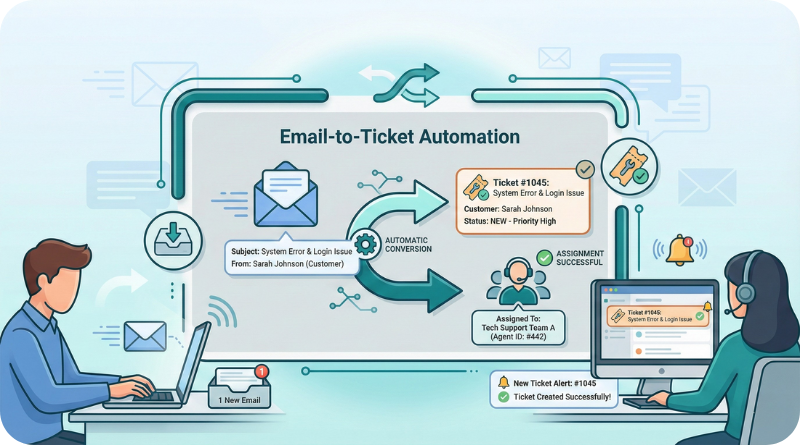
Email-to-Ticket Automation
With the Email Configuration feature, a helpdesk ticket is created automatically whenever a customer sends an email to your support address. This eliminates the need to read and convert emails into tickets manually. The app captures the message, customer details, and subject line in a clean, ticket-format. This saves a lot of time and ensures you never miss a customer request. It also helps keep all communication organized in one place. Whether the email is about a complaint, question, or request, the system instantly logs it and assigns it for action.
Multi-User Assignment
Sometimes a support issue requires more than one person to work on it. With Multi-User Assignment, you can assign a ticket to multiple team members simultaneously. This is useful for complex problems that need input from different departments. Each assigned user can update the ticket, add notes, and help in solving the issue. It improves teamwork and speeds up resolution. No need to duplicate tickets or send emails manually; the system keeps everyone aligned. This feature ensures faster support, better communication, and higher-quality solutions.


Merge Duplicate Tickets
There may be situations in which customers send the same query multiple times, or different users report the same issue. The Merge Ticket feature lets you combine these tickets into a single ticket. This keeps your helpdesk clean and avoids confusion. In a merge, everything is retained in a single ticket, including messages, attachments, and customer information. Consequently, your team can work towards the solution without worrying about handling duplicate tickets. This saves lots of time and reduces workload, enhancing the accuracy of reporting and tracking. It also helps maintain a correct service history for each customer.
Ticket Stage History Tracking
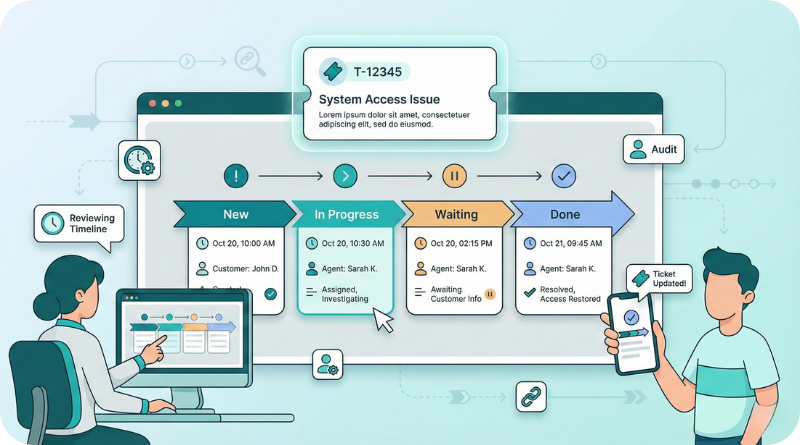
Tracking a ticket’s journey becomes simple with the Ticket Stage History feature. Every time a ticket moves from one stage to another, like New, In Progress, Waiting, or Done, the system records the date, time, and user who made the change. This creates a complete timeline of activities. It helps managers understand delays, monitor performance, and maintain transparency. Customers can also view how their ticket is progressing. This builds trust and ensures accountability within the support team. Having this history is helpful during audits, reviews, or customer disputes.
Helpdesk Document Management
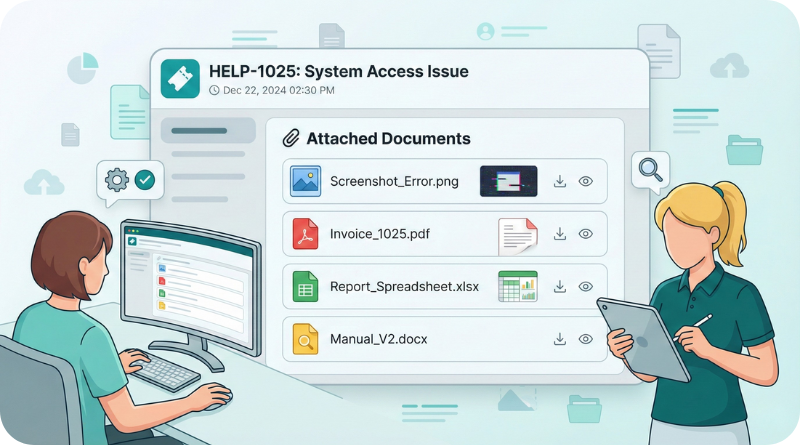
The Document Management feature allows you to attach important files directly to a ticket. These files can be screenshots, invoices, reports, manuals, or any supporting documents. Storing everything in one place makes communication easier for both the customer and the support team. Instead of searching emails or folders, staff can quickly view all details from the ticket itself. This helps solve issues faster and reduces the risk of missing information. For complex problems, documents are especially helpful in giving clarity and supporting accurate solutions.
Helpdesk Solution Library
You can record the solution with full details and attach images or documents when a ticket is resolved. Over time, this creates a solution library to help your team handle future issues fast. Customers can also view solutions on the portal to make self-service easier. This cuts the occurrence of repeated questions, thereby saving support time. Besides, it improves response quality by allowing team members to follow standard solutions. This feature is valuable during staff training and helps ensure consistent ticket handling across the helpdesk.

Benefits of Helpdesk Management
Deliver better customer experiences with smarter ticket management
Helps resolve customer issues faster with precise, organised ticket tracking.
Keeps all tickets and messages in one place, reducing confusion and mistakes.
Improves real-time communication between customers and support teams.
Gives customers quick updates, enhancing their satisfaction and trust.
Assigns tickets to the right team members for smooth and accurate work.
Saves time using automation like email-to-ticket and instant reminders.
Shows clear performance reports to help improve service quality easily.
Reduces missed or forgotten tickets with automatic alerts and notices.
Creates a valuable knowledge base by saving solutions for repeated issues.
Improves teamwork by allowing multiple users to collaborate on a ticket.
Why Choose Devintellecs for Odoo Helpdesk Management?
Smart, simple, and reliable Odoo helpdesk solutions tailored for your business.
Choosing Devintellecs for your Odoo Helpdesk Management means working with a team that understands real support challenges and knows how to fix them. We set up your helpdesk to make daily work easier for your staff and improve response time for your customers. Our team configures automation, email-to-ticket setup, custom workflows, and dashboards that match your business needs. We also provide training so your team can use the system confidently from day one. With Devintellecs, you get a smooth, well-organised help desk that helps your business handle customer issues faster, more professionally, and with better control.
Odoo ERP for Helpdesk Management FAQs
The Helpdesk Management System is an Odoo application that allows companies to administer and distribute customer support tickets, manage ticket resolution status, assign tickets to agents, and set up a knowledge base for problems encountered and their solutions.
Yes, the Helpdesk Management System can be combined with modules such as CRM, Sales, Inventory, and others to provide a view of customers.
Yes, the system allows for specific tasks that do not require human intervention to be triggered when certain conditions are satisfied and for the order of tasks performed to be configured.
Yes, the application’s features include the current stage of the ticket, such as open, in-progress, resolved, and closed, among other milestones.
Yes. On a first come, first serve basis, tickets can be assigned automatically or manually, considering the appropriate department, the nature of the assigned task, or the available workforce.
The provision for creating tickets from customer emails and responding to such email tickets from within the application has been incorporated.
Customers may log onto the portal, check the progress of their tickets, review the specifics of the resolution, and even make comments.
The Helpdesk Management System supports various languages and multi-company activities, which is a great fit considering the target market is global.
The integration possibilities are indeed available thanks to additional integration plugins that allow communication through WhatsApp or Slack.
It is possible to set up automatic notifications to provide Follow-up actions on tickets that have not been resolved in a timely manner.
Talk To Our Best Odoo Expert
Searching for a smooth way to track and resolve support problems faster?